Model O Minus Specs, Features, and Value: Is it worth the price tag?
The Model O Minus (often written Model O-) is a compact, ultralight gaming mouse that helped popularize the "honeycomb shell" trend and the push toward sub‑70‑gram wired mice. Marketed at gamers who prioritize speed, control, and minimal hand fatigue, the Model O Minus pairs a stripped‑down, perforated chassis with a high‑performance optical sensor and customizable RGB. This review examines the Model O Minus’s specifications and features, evaluates real‑world performance across common use cases, compares it to similar products, and offers a practical buying guide so potential buyers can judge whether it represents good value for the price.
Introduction: Who the Model O Minus is for
The Model O Minus is designed for players who value low weight and nimble handling—particularly first‑person shooter (FPS) and competitive gamers who prefer fast flicks and long, controlled sweeps. It also appeals to users with smaller hands or those who use fingertip or claw grips. Beyond esports, the Model O Minus suits anyone who spends long sessions mousing and wants to reduce wrist strain. That said, its honeycomb shell and focus on minimalism mean it isn’t aimed at users who prioritize a luxurious, solid‑feeling chassis or who require a fully ambidextrous button layout with many side buttons.
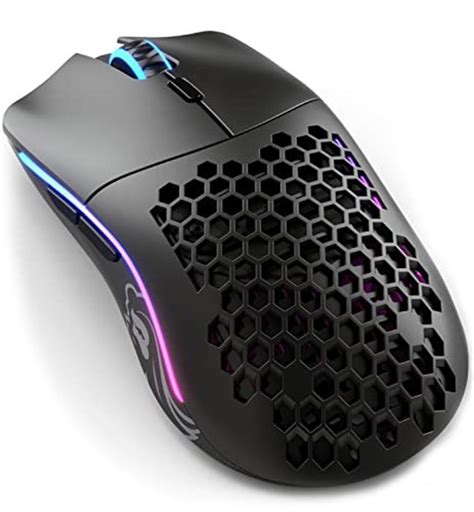
Specs at a glance
- Weight: Approximately 58 grams (lightweight wired category)
- Sensor: Pixart optical sensor (high‑end gaming grade, up to 12,000–16,000 DPI depending on revision)
- Switches: Mechanical left/right switches rated for tens of millions of clicks (commonly Omron or equivalent)
- Polling rate: Up to 1,000 Hz
- Cable: Flexible "Ascended" paracord‑style cable for reduced drag
- Feet: PTFE skates for smooth glide
- RGB: Underglow and logo RGB, configurable via vendor software
- Buttons: Typical layout: left/right, clickable scroll wheel, two side buttons, DPI toggle
- Size/Shape: Compact, low profile—aimed at small to medium hands, symmetrical outline
- Software: Vendor configuration utility for DPI, polling rate, macros, RGB
Detailed product review and analysis
Build and ergonomics
The Model O Minus uses a lightweight honeycomb shell that removes material from the top and sides to shave grams. The result is a mouse that feels noticeably airier than conventional solid mice. For users with smaller hands (roughly palm length under ~18 cm) and those who favor fingertip or claw grips, the Model O Minus provides an excellent fit: the compact dimensions shorten the distance from fingertips to the rear, and the low weight enables rapid accelerations with minimal effort.
That design choice is a trade‑off. The perforated shell can collect dust, sweat, and small debris more readily than sealed shells, which means periodic cleaning is necessary to maintain hygiene and smooth operation. Additionally, some users report that the honeycomb texture feels different at the contact points—either pleasantly grippy or slightly unusual—depending on personal preference.
Sensors and performance
At the heart of the Model O Minus is a high‑performance Pixart sensor known for accurate tracking, low latency, and stable lift‑off behavior. In practical terms, this translates to reliable cursor movement even during fast, jerky motions and small‑angle corrections—precisely what competitive FPS players need. The sensor’s DPI range is broad enough to accommodate everything from low‑sensitivity, large‑sweep setups to very high‑DPI configurations for multi‑monitor or precision work.
The mouse typically supports a 1,000 Hz polling rate, ensuring minimal input lag on modern systems. Combined with high‑quality mechanical switches and a responsive scroll wheel, the Model O Minus feels snappy and direct during gameplay and everyday use.
Cable and glide
Traditional braided cables can be stiff and introduce drag; the Model O Minus addresses this with a lightweight paracord "Ascended" cable. In everyday use, this cable behaves more like a wireless mouse in terms of freedom of movement, reducing friction across a mouse pad. PTFE feet contribute to a smooth glide, enabling the mouse to traverse large distances with little resistance—important for low‑sensitivity settings where wide arm movement is required.
Customization and software
The vendor's configuration software provides standard controls: DPI stages, RGB presets, polling rate selection, and button remapping. Macros and profile saving are also typically supported. For many users, the software is adequate, but enthusiasts who require advanced scripting or cloud profile sync may find third‑party tools or hardware fallback options necessary. The on‑board memory allows basic settings to persist across systems without software installed, which is convenient for tournament play or multi‑PC setups.
Shop the latest Electronics picks on Amazon.
View Offers →Durability and maintenance
Durability is generally solid for the price point. Mechanical switches and the sensor are reliable components; however, the honeycomb shell and thin top material invite caution—dropping the mouse or applying concentrated force can be riskier than with heavier, reinforced shells. The open design also requires occasional cleaning: compressed air and a soft brush will remove dust, while an alcohol wipe can address surface oils. Replacement feet and switches are sometimes available through the community, but repairs can be more involved than with a sealed chassis.
Real‑world use cases
Understanding who gets the most from the Model O Minus means looking at daily routines:
- Competitive FPS players: Benefit from the low weight and precise sensor for flicks and micro‑aim adjustments. Less fatigue during long practice sessions is a practical advantage.
- MOBA and RTS players: May prefer mice with more side buttons; the Model O Minus’s minimal button set is adequate but not optimized for heavy macro use.
- Office and productivity: Users who type and click all day appreciate the reduced strain; the compact shape is helpful when desk space is limited, though side button placement may be less critical here.
- Travel and LAN: Lightweight and reasonably portable, with onboard memory for profiles; the paracord cable reduces tangling in backpacks compared with stiffer cables.
- Small‑handed users and mobile gamers: The compact footprint and low weight make the Model O Minus one of the best mainstream options for smaller hands.
Pros & Cons
Pros
- Extremely lightweight construction reduces fatigue and enables faster movement
- High‑quality optical sensor for accurate, low‑latency tracking
- Flexible, low‑drag cable and smooth PTFE feet for excellent glide
- Compact size suits small to medium hands and fingertip/claw grips
- Customizable RGB and basic software controls with onboard memory
- Good value relative to premium ultralight competitors
Cons
- Honeycomb shell can collect dust and requires more frequent cleaning
- Less robust feel compared with solid‑shell, heavier mice—possible durability trade‑offs
- Compact shape may not suit large‑handed users or palm grip preference
- Limited number of side buttons for users who need many macros
- Not wireless—users who prefer no cable will need another model
Comparison table: Model O Minus vs. common alternatives
| Feature | Model O Minus | Cooler Master MM710 | Logitech G Pro (Wired) |
|---|---|---|---|
| Weight | <60 g (ultralight wired) | ~53 g (very light) | ~80–90 g (heavier traditional) |
| Sensor | High‑end Pixart optical (competitive grade) | Reliable Pixart sensor | Logitech HERO sensor (highly accurate) |
| Shape | Compact, symmetrical | Medium, ergonomic | Ambidextrous, slightly larger |
| Buttons | Typical 6‑button layout | Minimalist 6‑button layout | 6 buttons, tournament‑style |
| Cable | Flexible paracord | Lightweight paracord | Standard braided cable |
| RGB | Yes (logo & underglow) | No RGB (focus on weight) | Minimal RGB |
| Best for | Fast FPS, small hands, travel | Users wanting ultra‑low weight & simplicity | Users wanting solid build & professional feel |
| Value proposition | Balanced price/performance for ultralight mice | Very affordable ultralight | Premium mainstream esports mouse |
Buying guide: What to consider before choosing the Model O Minus
1. Hand size and grip style
Measure hand length and width or assess which mice have felt comfortable in store or at friends’ setups. The Model O Minus favors smaller hands and fingertip/claw grips. Users with larger hands or those who prefer a full palm rest might find larger mice more comfortable for long sessions.
2. Weight preference
Decide whether absolute lightness is a top priority. Ultralight mice reduce arm strain and can improve reaction time in fast games…3. Wired vs. wireless
The Model O Minus is a wired product (with a very flexible cable). Users who require a completely cable‑free setup should compare wireless ultralight options; those who prioritize lower latency and no battery management may prefer wired mice like the Model O Minus.
4. Sensor and tracking
Confirm the sensor model or performance characteristics: look for low acceleration, consistent tracking at high speeds, and a DPI range that suits the typical games or applications used. Competitive players should emphasize sensor quality above all else.
5. Durability and maintenance
Open shell designs demand occasional cleaning. If the user works in a dusty environment or dislikes maintenance, a sealed shell may be preferable. Also, consider the warranty and the vendor's reputation for support if repair or replacement parts are needed.
Discover deals on Electronics — updated daily.
Shop Amazon →6. Button layout and feature needs
Players who rely on many macros or side buttons for MMOs, MOBAs, or productivity shortcuts should evaluate whether the Model O Minus’s button count and placement meet their needs. For macro‑heavy workflows, a dedicated MMO mouse might be a better fit.
7. Software and ecosystem
Check that the configuration software supports the desired features (macro programming, DPI stages, on‑board profiles). If cross‑platform use is required (e.g., macOS and Windows), verify software compatibility or ensure the mouse functions acceptably without vendor software.
Is the Model O Minus worth the price?
Whether the Model O Minus is worth the price depends on priorities. For competitive gamers and users who prioritize a featherlight, responsive experience in a compact package, it delivers excellent value. The performance per dollar—sensor quality, cable, and weight optimization—compares favorably to similarly priced ultralight mice. For users who need maximal durability, a solid heavy chassis, many programmable buttons, or wireless convenience, the Model O Minus may not be the best match.
Value is also contextual. Compared with boutique ultralight offerings that carry a premium for exclusivity, the Model O Minus often offers similar performance and features at a more accessible price point. Against mainstream ergonomic mice, it provides a specialized experience rather than a generalist one; the cost should be weighed against expected benefits in the specific use case (e.g., measurable reduction in fatigue during lengthy sessions, or improved aim consistency for FPS players).
Final thoughts
The Model O Minus stands out as a considered balance of ultralight design, capable sensor performance, and practical features like a flexible cable and configurable software. It is particularly compelling for competitive players, smaller‑handed users, and anyone who values speed and low fatigue. The trade‑offs—open shell maintenance, less solidity than heavier mice, and a compact footprint—are important to acknowledge but are predictable given the design priorities.
Ultimately, the worth of the Model O Minus comes down to fit and use case. For the right user—someone seeking a fast, light, and precise wired mouse—it represents strong value and a worthwhile investment. For others who prioritize a different set of attributes, it is a specialized tool rather than a universal one. Prospective buyers are encouraged to consider hand size, grip style, and whether ultralight characteristics align with their daily needs before making a decision.